

Quick Answer
Outdoor build paid ads ROI tracking is defined as the practice of connecting ad spend directly to closed construction jobs through CRM integration, offline conversion uploads, and source tagging. Most outdoor construction businesses measure clicks and calls, then stop. The gap between a phone inquiry and a signed contract is where marketing budgets get wasted. Contractors who track ad spend to closed jobs report 20 to 35% higher marketing ROI than those tracking clicks alone. That difference is not a platform setting. It is a data infrastructure decision.
What tools do you need for accurate outdoor build paid ads ROI tracking?
Accurate paid ads ROI tracking for outdoor construction requires four core components: source tagging at lead intake, a CRM that preserves attribution data, Google Ads GCLID capture with offline conversion import, and Meta Pixel plus Conversions API with event deduplication. Without all four, you are measuring activity, not revenue.
Source tagging and CRM requirements
Every lead entering your pipeline needs a source label attached at the moment of contact. That means phone calls tracked with dynamic number insertion tools like CallRail, web forms capturing UTM parameters, and offline inquiries logged manually with campaign codes. Your CRM, whether you use HubSpot, Jobber, or ServiceTitan, must store that source data and carry it forward until the job closes. CRMs that overwrite source fields or lack custom attribution columns will break your tracking before it starts.
Google Ads GCLID and offline conversion import
Google Ads assigns a unique GCLID parameter to every click. When a visitor submits a form or calls after clicking a Google ad, your CRM captures that GCLID alongside the lead record. When the job closes, you export the GCLID and the revenue value, then upload that file back to Google Ads as an offline conversion. Uploading offline conversions shifts Smart Bidding from optimizing clicks to optimizing actual closed revenue. That is a fundamental change in how your campaigns make decisions.
Meta Pixel and Conversions API setup
Meta requires a dual tracking approach. The browser-based Pixel captures front-end events, while the Conversions API sends the same events server-side. Both systems must fire for the same user action, and event deduplication requires matching event_name and event_id parameters in both payloads. Without this match, Meta counts conversions twice, inflates your reported results, and corrupts the optimization signals your campaigns rely on. Meta accounts with Pixel and CAPI properly configured see 17.8% lower cost per result than Pixel-only setups.

Pro Tip: Set up a UTM naming convention before launching any paid campaign. Use consistent values for utm_source, utm_medium, and utm_campaign across Google Ads, Meta, and any other channel. Inconsistent naming makes cross-channel ROI comparison nearly impossible.
| Tracking Component | Purpose | Tool Examples |
|---|---|---|
| UTM parameters | Tag traffic source at click | Google Ads auto-tagging, manual UTM builder |
| GCLID capture | Link Google clicks to CRM leads | HubSpot, Jobber, custom form fields |
| Meta Pixel + CAPI | Dual-layer event tracking | Meta Events Manager, server-side integration |
| Offline conversion upload | Connect closed jobs to ad campaigns | Google Ads import, Meta offline events |
| CRM attribution fields | Preserve source data through pipeline | ServiceTitan, HubSpot, custom CRM fields |
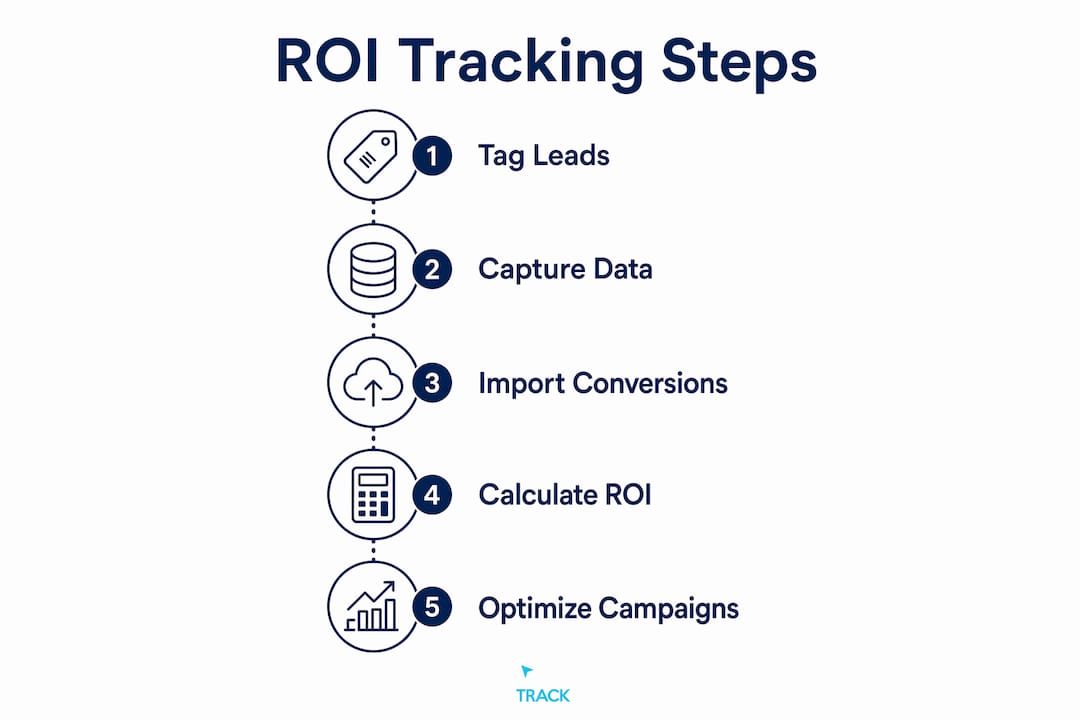
How to implement ROI tracking for outdoor build paid ad campaigns
The implementation follows a clear sequence. Skipping any step breaks the chain between ad spend and closed revenue.
- 1Tag every lead at entry. When a prospect submits a form, calls your tracking number, or walks in from a direct mail piece, record the source immediately. For digital leads, UTM parameters and GCLID values should auto-populate into your CRM via hidden form fields. For offline leads, train your intake team to ask and log the source manually.
- 1Carry attribution through the pipeline. Your CRM deal record must retain the original source from first contact through every stage: estimate sent, proposal accepted, deposit paid, job closed. Do not allow pipeline stages to overwrite the original source field. This is the most common point of failure in outdoor construction marketing attribution.
- 1Upload offline conversions monthly. At the end of each month, export closed jobs with their GCLID values and revenue amounts from your CRM. Upload this file to Google Ads under Tools and Settings, then Conversions, then Offline Conversions. For Meta, use the Offline Events tool in Events Manager. Contractor sales cycles often run 2 to 6 weeks from click to close, so monthly uploads give deals enough time to complete before you evaluate performance.
- 1Calculate ROI by channel. Use the formula: ROI = (Revenue minus Spend) divided by Spend. Run this calculation for each paid channel separately. A channel generating $12,000 in closed revenue on $2,000 in spend produces a 500% ROI. That number tells you where to increase budget.
Pro Tip: Build your monthly ROI report as a recurring calendar task. Set it for the 5th of each month, covering the prior month's closed jobs. Reviewing ROI too early, before deals close, produces misleading numbers that can cause you to cut campaigns that are actually working.
| Channel | Monthly Spend | Closed Revenue | ROI |
|---|---|---|---|
| Google Search | $2,000 | $14,000 | 600% |
| Meta Ads | $1,500 | $7,500 | 400% |
| Google Display | $500 | $1,000 | 100% |
| Total | $4,000 | $22,500 | 463% |
The table above shows how channel-level ROI guides budget reallocation. Display is underperforming. Search is the clear winner. Without this breakdown, you would be averaging across channels and missing the signal entirely.
How do you troubleshoot common mistakes in paid ads ROI tracking?
The most frequent errors in outdoor build paid ads ROI tracking fall into four categories. Each one produces misleading data that leads to poor budget decisions.
- Double-counted conversions from Meta. If your Pixel and CAPI both fire without deduplication, Meta reports each conversion twice. Low Event Match Quality scores below 7.0 indicate that your customer data is not matching reliably, which can create up to a 30% gap between expected and actual conversion signals. Check your EMQ score in Meta Events Manager under the Data Sources tab.
- Tracking calls without linking to revenue. Call tracking tools like CallRail show you call volume and duration. That is not ROI. A call only becomes a data point when you know whether it turned into a closed job and how much that job was worth. Connect your call tracking platform to your CRM so every call record inherits the deal outcome.
- Reviewing ROI before deals close. Outdoor construction sales cycles run 2 to 6 weeks. If you pull a weekly ROI report on a campaign that started 10 days ago, most of its leads have not closed yet. You will see high spend and low revenue, and you may pause a campaign that would have shown strong returns by month end.
- Broken UTM parameters from manual errors. A single typo in a UTM tag, such as "gogle" instead of "google" in utm_source, creates a separate unrecognized traffic source in your analytics. Audit your UTM parameters quarterly using Google Analytics 4's Traffic Acquisition report. Any source labeled "direct" that shows unusual volume is often a sign of broken tagging.
Pro Tip: Use Google Tag Manager to fire your Meta Pixel and CAPI events from a single trigger. This makes deduplication easier to manage and reduces the chance of mismatched event_id values between browser and server payloads.
Which metrics beyond ROI should you track for outdoor paid campaigns?
ROI is the headline number, but three supporting metrics tell you why that number is what it is. Understanding cost per lead, customer acquisition cost, and customer lifetime value gives you the full picture of outdoor marketing analytics.
Cost per lead (CPL) measures how much you spend to generate one inquiry. It is useful for comparing channels at the top of the funnel, but it misleads without close rate context. A $75 lead closing at 50% costs $150 per customer. A $25 lead closing at 10% costs $250 per customer. The cheaper lead is actually more expensive when you account for the full sales process.
Customer acquisition cost (CAC) is the metric that actually connects to your business model. CAC equals total ad spend divided by the number of new customers acquired. If you spend $4,000 in a month and close 8 new jobs, your CAC is $500. Whether that is profitable depends entirely on your average job value and your customer lifetime value.
Customer lifetime value (CLV) is the most underused metric in outdoor construction marketing. CLV in outdoor and HVAC fields often exceeds $4,800 when you include maintenance contracts, repeat projects, and referrals. A CAC of $500 against a CLV of $4,800 produces a 9.6x return over the customer relationship. That context changes how aggressively you should be willing to spend to acquire each new customer.
| Metric | What it measures | Why it matters |
|---|---|---|
| Cost per lead (CPL) | Spend per inquiry generated | Useful for channel comparison, not profitability |
| Customer acquisition cost (CAC) | Spend per closed job | Directly tied to business profitability |
| Customer lifetime value (CLV) | Total revenue per customer relationship | Sets the ceiling for acceptable CAC |
| Return on ad spend (ROAS) | Revenue per dollar of ad spend | Quick performance check by campaign |
Key takeaways
Outdoor build paid ads ROI tracking works only when you connect every ad click to a closed job through CRM attribution, offline conversion uploads, and monthly revenue-based reporting.
| Point | Details |
|---|---|
| Link spend to closed jobs | Calculate ROI monthly as (Revenue minus Spend) divided by Spend, not by clicks or calls. |
| Use GCLID and offline uploads | Export closed job revenue with GCLID values back to Google Ads to activate Smart Bidding on real revenue. |
| Deduplicate Meta events | Match event_name and event_id in Pixel and CAPI payloads to prevent inflated conversion counts. |
| Review on a monthly cycle | Outdoor sales cycles run 2 to 6 weeks, so weekly ROI reviews produce misleading data. |
| Track CPL, CAC, and CLV together | CPL alone misleads. CAC and CLV reveal whether your ad spend is actually profitable long-term. |
What I have learned about ROI tracking in outdoor construction paid ads
The gap I see most often is not a platform problem. It is a handoff problem. The ad platform does its job. The lead arrives. Then it disappears into a spreadsheet, a voicemail, or a CRM that was never configured to track where it came from. By the time the job closes six weeks later, nobody connects that revenue back to the Google Search campaign that generated the original click.
The businesses that fix this do not need bigger budgets. They need better data infrastructure. When you upload offline conversions to Google Ads, Smart Bidding stops guessing and starts optimizing toward the jobs that actually close. That shift alone, in my experience working with outdoor construction clients, produces measurable improvement within two to three months. The lead-to-sale attribution gap is the weakest link in outdoor construction marketing, and it is almost always fixable with the right CRM setup and a monthly reporting discipline.
The Meta side requires more technical care. Proper Pixel and CAPI deduplication is not optional if you want reliable data. I have seen accounts where reported conversions were nearly double actual closed jobs because deduplication was never configured. That corrupts your optimization signals and causes Meta to show your ads to the wrong people. Getting your EMQ score above 7.0 is not a nice-to-have. It is the foundation of trustworthy paid ad performance data.
The monthly ROI review cycle is the organizational habit that makes all of this worth the setup effort. Without it, even perfect tracking produces data nobody acts on.
How Click Track Marketing helps outdoor build businesses track paid ads ROI
Outdoor construction businesses that want to stop guessing and start measuring need more than a reporting dashboard. They need the full attribution chain built correctly from the start.
Click Track Marketing builds that infrastructure. From CRM-to-ad-platform integration and offline conversion uploads to monthly revenue attribution reporting through PeopleLytics, every piece is designed to connect your ad spend to closed jobs. The AI-first approach at Click Track Marketing means your tracking is built to work with how ad platforms actually make decisions today, not how they worked three years ago. If you are ready to see which campaigns are generating real revenue for your outdoor build business, explore what Click Track Marketing's agency services can do for your paid media program.
Want to know exactly which marketing is making you money?
Get a free attribution audit — we'll show you where your leads and revenue actually come from. Answer two quick questions to start.