
Quick Answer
Google Business Profile now links directly to GA4: in GA4 go to Admin → Product Links → Google Business Profile Links → Link, then choose the profile you manage. Once connected, a new Business Profile section reports seven metrics — interactions, website clicks, calls, direction requests, messages, bookings, and menu views — pulled straight from Search and Maps. It's a genuine upgrade to activity tracking, but it counts actions, not outcomes: it will tell you 46 people called, never which calls turned into signed jobs or dollars.
If you run a roofing company, a law firm, a med spa, or any business where one closed deal is worth thousands of dollars, you already know the real question isn't "how many people called us this month." It's "which of those calls turned into revenue, and where did that lead actually come from."
Google just made a small move toward answering the first question. It still can't answer the second one. Here's what changed, what it's genuinely useful for, and where you'll need something built on top of it if you're serious about knowing your numbers.
What Google actually launched
As of June 2026, Google Analytics 4 supports a native link to your Google Business Profile. You set it up once, from the Admin panel under Product Links, and GA4 starts pulling data directly from your Search and Maps listing instead of relying on you tagging your GBP website link with UTM parameters and hoping every action got captured.
Once it's connected, a new Business Profile section shows up in your GA4 reports, covering seven metrics:
- Interactions — a combined total across all actions
- Website clicks
- Calls
- Direction requests
- Messages
- Bookings
- Menu views
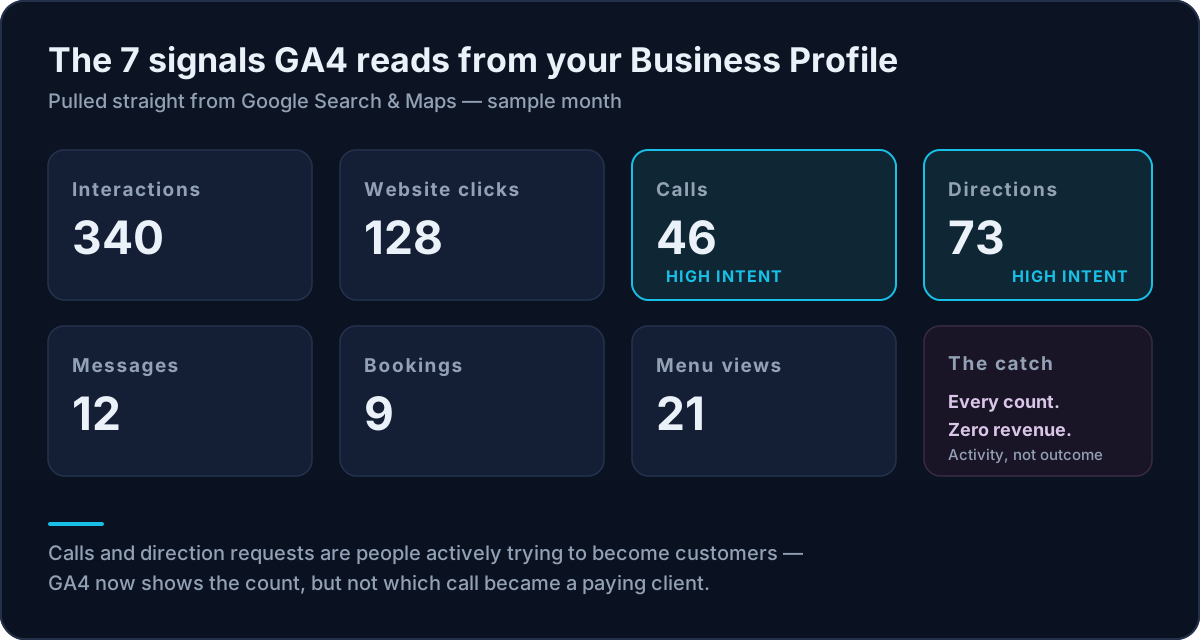
For most of the businesses we work with, calls and direction requests are the two that matter. Someone tapping "Call" from a Maps listing or requesting directions to your office is not a top-of-funnel browser. That's a person actively trying to become your customer. Before this update, that behavior happened entirely outside your website and, as far as GA4 was concerned, it didn't exist.
Why this matters for home services, legal, medical, and real estate
We build marketing infrastructure for businesses where the average job, case, or transaction runs into the thousands or tens of thousands of dollars. For that kind of business model, the gap this update closes is a real one.
Think about how a homeowner finds a roofer after a storm, or how someone searches for a personal injury attorney at 11pm. A huge share of that intent never touches your website. It happens entirely inside Google Search and Google Maps: someone sees your listing, checks your reviews, and calls you directly from the search results page. Your website analytics never saw that person — even though they may have become your best client of the quarter.

Linking GBP to GA4 means that behavior finally shows up somewhere in your reporting stack instead of living exclusively inside a separate Business Profile dashboard nobody on your team checks. And if that Maps visibility is where your customers find you in the first place, it starts with ranking in the Google Maps pack — the profile is the engine this whole report is measuring.
What this update does not do (read this before you build reporting around it)
This is the part most of the "how to set this up" articles skip past, and it's the part that actually matters if you're spending real ad dollars.
It aggregates every location into one number. If you have more than one Business Profile linked to a single GA4 property, all the metrics get combined. A five-location HVAC company or a law firm with three offices sees one call count, one directions count, with no way to break it down by location inside GA4. For a single-location business, that's a non-issue. For anyone managing multiple locations, it's a real limitation.
It only holds six months of data. GA4 will not show you Business Profile activity older than six months, no matter how far back your reporting date range goes. If you're trying to build a year-over-year view of how your local presence is performing, this integration alone will not get you there.
You can't filter, segment, or explore it. These metrics live in their own fixed collection. They can't be pulled into a GA4 Exploration, added to a comparison, or filtered by campaign, device, or audience. You get the cards Google gives you and nothing more.
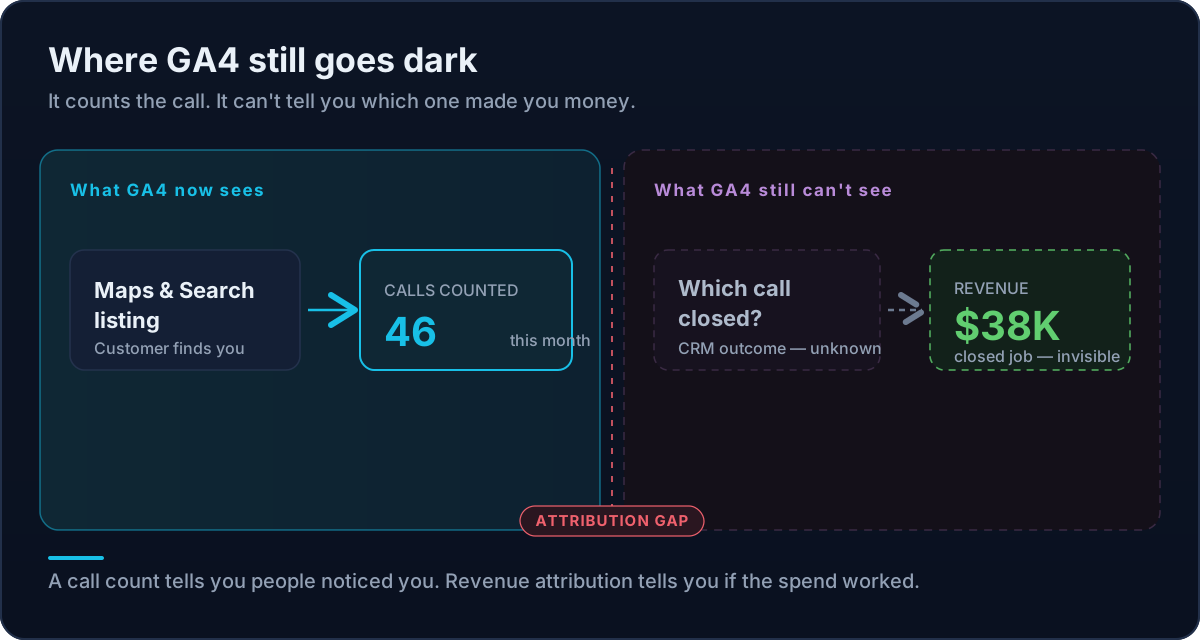
It's a count, not an outcome. This is the big one. GA4 will now tell you that your Business Profile generated 340 interactions and 46 phone calls last month. It will not tell you which of those 46 calls turned into an actual signed job, closed case, or booked appointment — and it definitely will not tell you what that call was worth in real revenue.
| What you want to know | GBP → GA4 integration | Revenue attribution layer |
|---|---|---|
| How many people called from Search/Maps | Yes | Yes |
| Which location the call came from | No (combined) | Yes |
| More than six months of history | No | Yes |
| Which call became a booked job | No | Yes |
| What that call was worth in revenue | No | Yes |
| Cost per acquired customer by channel | No | Yes |
The real question this update still doesn't answer
Here's the thing we tell every client with a large average ticket: a call count is not a business metric. It's an activity metric.
Forty-six calls in a month sounds great until you find out that forty of them were tire-kickers, wrong numbers, or people asking if you service an area you don't cover — and the six calls that actually became business came from a single referral partner, not your Google listing at all. Without connecting that call to a CRM record, a closed deal, and a dollar amount, you're managing your marketing off noise.
“Platforms are very good at counting activity and very bad at telling you which activity turned into revenue. Google's new integration is a genuine improvement to activity counting. It changes nothing about the revenue side of the equation.”
That's the layer we build for clients: connecting every call, form, and booking back through to a CRM outcome and a dollar figure, so you can see the full chain from an ad impression or a Maps listing all the way to a closed deal. A call count tells you people are noticing you. Revenue attribution tells you whether your marketing spend is actually working.
How to connect Google Business Profile to GA4 (5 minutes, worth doing regardless)
Even with the limitations above, there's no reason not to turn this on. It's free, it takes a few minutes, and it adds a data source you didn't have before.
- 1Confirm you have Editor or Administrator access on the GA4 property, and Owner or Manager access on the Google Business Profile you want to link.
- 2In GA4, go to Admin → Product Links → Google Business Profile Links.
- 3Click Link and follow the prompts to select the profile you manage.
- 4Review the data-sharing screen and confirm.
- 5Give it a few minutes, then check Reports for the new Business Profile collection.
If you manage multiple locations under one GA4 property, know going in that you're getting a combined view, not a location-by-location breakdown. Keep your UTM tagging in place regardless — this integration supplements that data, it doesn't replace it.
What we'd recommend instead of stopping there
Turn this on. It's a free win and it's better than nothing. But if calls, direction requests, and bookings are meaningful revenue events for your business — and for most of our clients they are — treat this as one input into a bigger system rather than the finish line.
The businesses that actually grow off their marketing spend aren't the ones with the most dashboards. They're the ones who can trace a single dollar of ad spend all the way through to a closed deal. That's the infrastructure question worth asking before you get too comfortable with a new set of activity metrics: can you tell me, right now, which marketing dollar produced which piece of revenue?
If the honest answer is no, that's the conversation worth having before your next budget review. Here's what it looks like when your Business Profile data, your ad spend, and your actual closed revenue live in one place instead of three.
Want to know exactly which marketing is making you money?
Get a free attribution audit — we'll show you where your leads and revenue actually come from. Answer two quick questions to start.