

Quick Answer
Pixel tracking identifies leads by firing a conversion event, specifically the Lead event, when a user completes a qualifying action such as submitting a contact form, and sending that event data to advertising platforms like Meta Pixel or Google Ads for attribution and optimization. This mechanism is the backbone of digital lead identification, turning anonymous site visits into measurable marketing signals. When configured correctly, pixel data tells you which campaigns, audiences, and creatives are producing real leads, not just clicks. In 2026, with browser privacy restrictions tightening and consent requirements expanding under frameworks like IAB TCF 2.3, understanding how pixel tracking works is no longer optional for marketers who want accurate numbers.
How pixel tracking collects and reports lead data
Pixel tracking works through a client-side JavaScript snippet placed on your website. When a user loads a page or completes an action that contains the pixel code, the browser fires an HTTP request to the tracking server. That request carries a payload of event metadata including timestamps, device type, geographic location, referral URL, browser type, and IP address. This happens invisibly, using either a 1x1 transparent image or a JavaScript call, with no visible interruption to the user experience.
The data collected maps directly to your marketing funnel. Platforms like Meta Ads Manager and Google Ads receive these signals and connect them to the ad interactions that preceded the visit. Reporting dashboards then reconstruct the user journey, showing you which touchpoints contributed to a lead conversion. Three distinct event types feed this process:
- Impression events: fired when an ad is displayed to a user
- Click events: fired when a user clicks through to your site
- Conversion events: fired when a user completes a defined action, such as submitting a lead form
Each event type carries different weight in attribution. Conversion events drive optimization signals that platforms use to train their algorithms toward audiences most likely to convert. Without accurate conversion data, the algorithm is flying blind.
Why proper pixel event placement matters for lead accuracy

The single most common source of inflated lead counts is not a technology failure. Most lead counting errors come from firing the Lead event on the wrong page. Specifically, placing the Lead event on the form display page rather than the post-submission confirmation page causes the pixel to fire every time someone views the form, regardless of whether they submitted it. This inflates lead counts by 5 to 10 times, corrupts your cost-per-lead reporting, and trains your ad platform’s algorithm on false signals.
Correct placement follows a simple sequence:
- 1Deploy the pixel base code across every page of your site so platform visibility is complete.
- 1Place the Lead event exclusively on the confirmation or thank-you page that loads only after a successful form submission.
- 1Verify the event fires once per submission using a debugging tool such as Meta Pixel Helper or Google Tag Assistant.
- 1Confirm the event does not fire on page refresh by checking for deduplication logic in your tag manager setup.
Deduplication is the second critical layer. When you run both browser-side pixel events and server-side events simultaneously, the same lead action can be reported twice. Assigning a stable unique event\_id to each conversion, matched exactly between the client and server event, allows platforms like Meta to deduplicate and count each lead only once.
Pro Tip: Use Google Tag Manager’s built-in trigger conditions to fire your Lead event only on URLs containing “/thank-you” or “/confirmation.” This prevents accidental firing on form pages and removes the need for manual code changes every time your site updates.
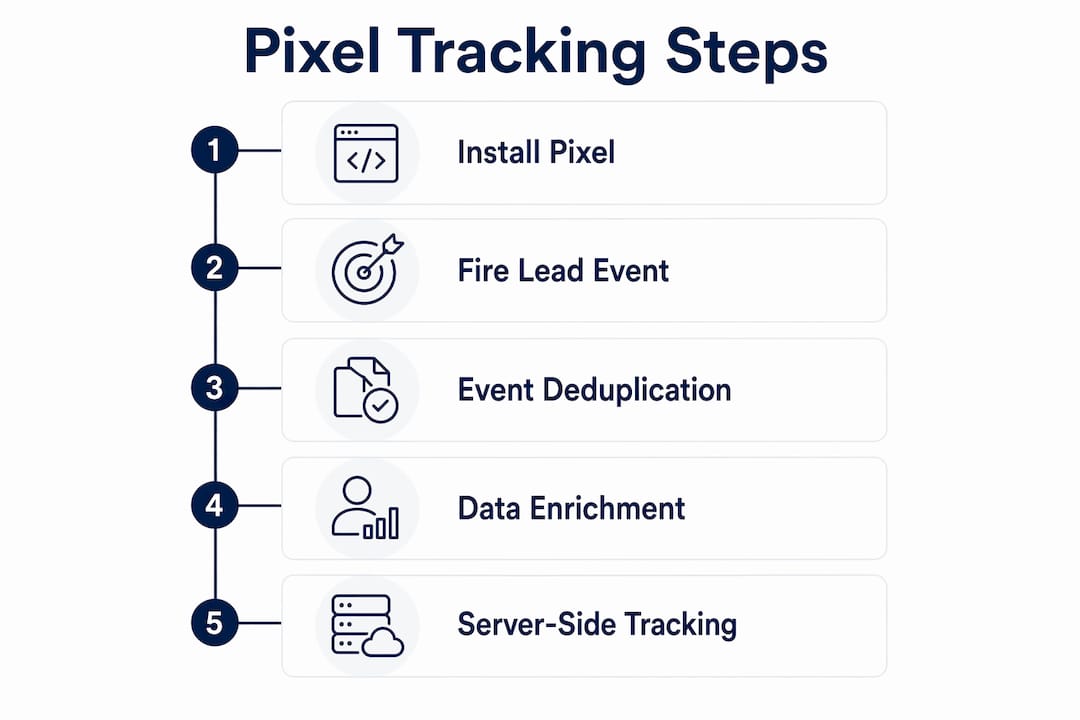
Beyond placement and deduplication, enriching your Lead event with parameters like "value, content\_name, and lead\_type\` gives platforms richer data to work with. Marketers who also track downstream events such as Contact or CompleteRegistration can distinguish between raw form fills and higher-quality leads who took a second action. This distinction matters when you are optimizing campaigns toward revenue rather than volume.
How server-side tracking complements pixel tracking for better lead capture
Browser-based pixel tracking has a visibility problem. Ad blockers, Safari’s Intelligent Tracking Prevention, Firefox’s Enhanced Tracking Protection, and Chrome’s evolving cookie policies all reduce the number of pixel calls that successfully reach the tracking server. In a pixel-only setup, you may be capturing as little as 40 to 60 percent of actual lead conversions.
Server-side tracking solves this by sending conversion data from your web server directly to the advertising platform’s API, bypassing the browser entirely. The result is that combining browser and server-side tracking improves lead attribution accuracy from roughly 40 to 60 percent up to 80 to 95 percent. That gap represents real leads your campaigns were generating but never getting credit for.
The hybrid approach works through these components:
- Client-side pixel: captures real-time behavioral signals and feeds them to the platform immediately
- Server-side event API: sends a matching conversion event from your server with first-party identity signals such as hashed email or phone number
- Shared event\_id: links the two events so the platform deduplicates them rather than counting both
“Hybrid tracking with first-party identifiers and server-side event forwarding is the only reliable method to maintain lead attribution integrity under current cookie and browser restrictions.”
Meta’s Conversions API and Google’s Enhanced Conversions are the two primary server-side frameworks available to most marketers today. Both require a developer or a tag management platform like Segment or Google Tag Manager Server-Side to implement correctly. The investment is worth it. When your campaigns are optimizing on 85 percent of actual leads instead of 50 percent, every budget decision you make becomes more accurate.
How attribution models use pixel data to assign lead credit
Pixel events are the raw input. Attribution models are the logic layer that decides which ad interaction gets credit for producing a lead. Understanding the difference between these two concepts prevents a common mistake: assuming that more pixel data automatically means better attribution.
| Attribution model | How it assigns lead credit | Best use case |
|---|---|---|
| Last click | 100% credit to the final ad clicked before conversion | Direct response campaigns with short sales cycles |
| First click | 100% credit to the first ad interaction in the journey | Brand awareness measurement and top-of-funnel analysis |
| Data-driven | Credit distributed across touchpoints based on statistical contribution | Accounts with sufficient conversion volume for machine learning |
Google Ads conversion tracking records conversions after ad clicks on thank-you pages and attributes credit according to whichever model you configure. The platform defaults to last-click for most accounts, but data-driven attribution is available once you accumulate enough conversion events to train the model. Switching models changes which campaigns appear to be performing well, which directly affects where you allocate budget.
The practical implication is straightforward. If you run both paid search and paid social, last-click attribution will typically over-credit search and under-credit social, because search captures intent at the end of the journey. Data-driven attribution redistributes credit more accurately across the full path. The pixel events themselves do not change. The model applied to them does.
Practical tips and common pitfalls in tracking leads with pixels
Getting pixel tracking right requires ongoing maintenance, not just a one-time setup. Here are the most frequent failure points and how to address them:
- Firing on the wrong page: Place Lead events only on post-submission confirmation pages. Firing on form display pages inflates counts by up to 10 times.
- Skipping deduplication: Always assign a unique
event_idto each lead event and pass it through both browser and server-side calls.
- Missing parameters: Include
value,currency, andcontent_namein your Lead event payload. Richer data improves platform optimization and reporting.
- Ignoring consent requirements: In 2026, IAB TCF 2.3 compliance requires that pixel firing align with user consent signals. Firing pixels before consent is granted creates legal exposure and data quality problems.
- Never auditing: Run a pixel audit quarterly. Use Meta Pixel Helper and Google Tag Assistant to confirm events fire correctly after site updates, form changes, or CMS migrations.
Pro Tip: Third-party pixels carry data breach risk, particularly in regulated industries. Where possible, use first-party or server-side implementations to control exactly what data leaves your environment and where it goes.
The consent piece deserves extra attention. Many marketers set up pixel tracking correctly at launch and then ignore it as their consent management platform evolves. Consent signals must be integrated directly into your pixel firing logic so that tags only activate for users who have opted in. This is not just a compliance requirement. It also protects data quality, since leads captured without proper consent may be excluded from platform reporting anyway.
Key takeaways
Pixel tracking identifies leads accurately only when the Lead event fires on the confirmation page, deduplication is in place, and server-side tracking fills the gaps left by browser restrictions.
| Point | Details |
|---|---|
| Lead event placement | Fire the Lead event only on the post-submission confirmation page to prevent inflated counts. |
| Deduplication with event\_id | Assign a stable unique event\_id to each conversion to prevent double counting across browser and server events. |
| Server-side tracking gap | Hybrid tracking improves lead attribution accuracy from 40 to 60 percent up to 80 to 95 percent. |
| Attribution model selection | Choose your attribution model deliberately, since it determines which campaigns receive credit and budget. |
| Consent compliance | Align pixel firing with IAB TCF 2.3 consent signals to protect both legal standing and data quality. |
The part most marketers skip entirely
I have reviewed pixel setups for dozens of businesses, and the pattern is almost always the same. The pixel is installed. The Lead event exists. And the data is completely wrong because the event fires on the form page, not the confirmation page. The fix takes ten minutes. The damage from running campaigns on bad data for six months is much harder to undo.
What I find more interesting is the attribution layer. Most business owners look at their Google Ads dashboard, see last-click conversions, and assume that tells the full story. It does not. Paid social often does significant work earlier in the buyer journey and gets zero credit under last-click. When you switch to data-driven attribution and layer in server-side tracking, the picture changes. Campaigns you thought were underperforming turn out to be driving real leads. Campaigns you were scaling turn out to be capturing credit they did not earn.
The privacy changes in 2026 add another layer of complexity that most agencies are not equipped to handle. Consent management, server-side forwarding, and first-party data strategies are not optional add-ons anymore. They are the foundation. Marketers who treat pixel tracking as a set-and-forget task will see their attribution accuracy erode steadily as browser restrictions tighten. The ones who build a proper pixel tracking and attribution setup from the start will have a measurable advantage.
Continuous testing is not a best practice. It is the only practice that works. Audit your pixels quarterly. Validate your event data against your CRM. If your pixel says you got 200 leads last month and your CRM shows 80, something is broken. Find it.
See how Clicktrackmarketing closes the loop on your lead data
Most businesses have pixels installed but no clear picture of whether those pixels are producing revenue. Clicktrackmarketing is a San Diego-based agency that builds the attribution infrastructure behind accurate lead tracking, from correct pixel placement and server-side event forwarding to full revenue reporting. Our proprietary tools, including PeoplePixel and PeopleLytics, surface the anonymous visitors and revenue signals your current setup is missing. If you want to know exactly which campaigns are producing customers and which are wasting budget, book a free strategy call with our team. You can also explore our Google Ads management services to see how accurate pixel data drives better paid media outcomes.
Want to know exactly which marketing is making you money?
Get a free attribution audit — we'll show you where your leads and revenue actually come from. Answer two quick questions to start.