

Quick Answer
A tracking pixel is a 1×1 transparent image or JavaScript snippet embedded in a webpage or email that fires an HTTP request to a remote server the moment a user loads that content. That single request transmits device metadata, behavioral signals, and session identifiers to your analytics or ad platform in real time, forming the foundation of how tracking pixels work across modern digital marketing.
Tracking pixels appear on approximately 30% of the 100,000 most popular websites as of 2026. That figure tells you this technology is not a niche tactic. It is standard infrastructure for any marketer who needs to measure what users do after they see an ad, open an email, or land on a product page.
How tracking pixels work: the technical mechanics
Understanding the step-by-step process removes the mystery and helps you deploy pixels with precision rather than guesswork.
- 1Pixel is embedded. A developer or tag manager places a small HTML image tag or JavaScript snippet in a webpage, email template, or ad creative. The code references an image file hosted on a tracking server.
- 2User loads the content. When a browser renders the page or email, it requests that image file from the tracking server. This triggers the pixel to fire.
- 3HTTP request is sent. Pixel firing triggers a silent HTTP request within milliseconds, sending device metadata and user identification markers to the server. The user sees nothing.
- 4Server logs the event. The tracking server receives the request, records the associated data, and links it to a user profile, campaign ID, or conversion event.
- 5Response completes invisibly. Pixels typically return a 1×1 transparent image or HTTP 204 response to complete the request without displaying any visible content to the user.
The difference between image-based pixels and JavaScript pixels matters in practice. An image pixel sends a basic GET request with limited data. A JavaScript pixel can read browser cookies, capture dynamic page variables like product IDs and cart values, and send far richer event data. Most major ad platforms, including Meta and Google Ads, use JavaScript-based pixels for exactly this reason.
Pro Tip: Use a tag management system like Google Tag Manager to deploy and update pixels without touching your site's source code. This reduces deployment errors and lets your marketing team move faster without waiting on developers.

How do pixels, cookies, and server-side tracking compare?

These three technologies are related but serve distinct roles. Confusing them leads to gaps in your attribution model.
| Technology | Primary function | Where data lives | Privacy vulnerability |
|---|---|---|---|
| Tracking pixel | Transmits event data to external server | Remote server | Blocked by ad blockers and browser restrictions |
| Cookie | Stores user identifiers locally | User's browser | Deleted by users or blocked by browsers |
| Server-side tracking | Sends data from your server to ad platforms | Your server and platform | Minimal browser-level interference |
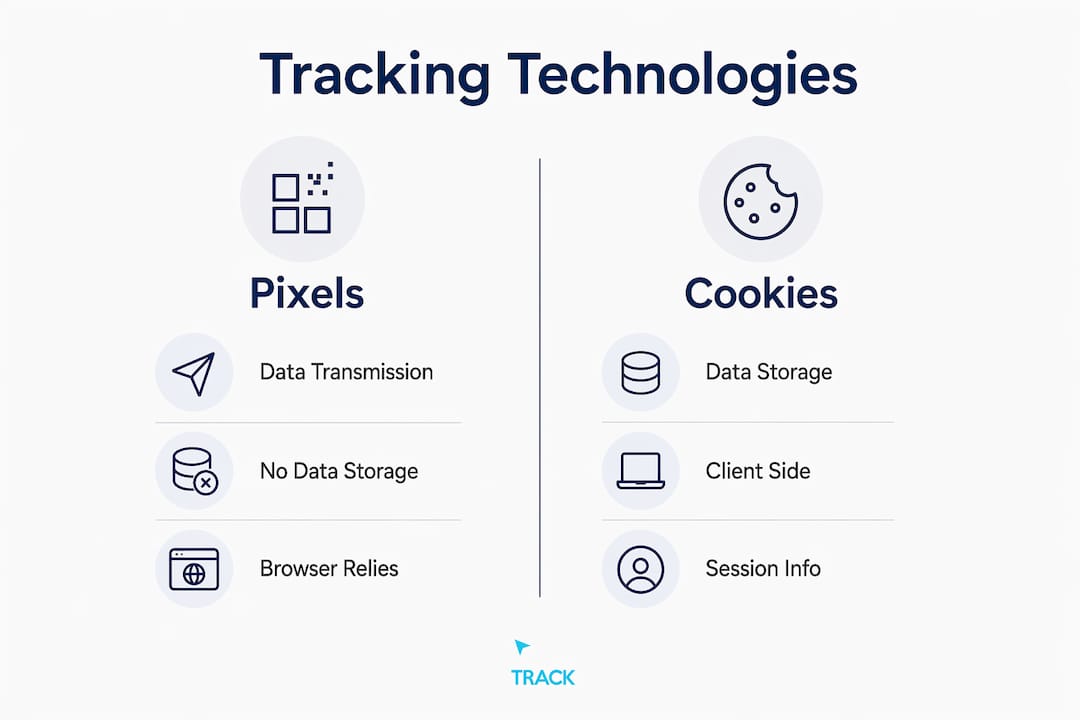
A tracking pixel is not a data storage tool like a cookie. It is a data transmission mechanism that reports user interactions in real time to external servers. Cookies store a user identifier on the device so the pixel can recognize returning visitors. Without a cookie, a pixel can still fire and record the event, but it cannot tie that event to a previous session.
The problem in 2026 is that client-side browser pixels are increasingly limited by privacy restrictions. Safari's Intelligent Tracking Prevention, Firefox's Enhanced Tracking Protection, and Chrome's ongoing privacy changes all reduce the reliability of browser-based pixels. On top of that, ad blockers prevent 30 to 40% of pixel requests from firing, causing significant underreporting in browser-based tracking systems. That is not a rounding error. It is a structural gap in your data.
Server-side tracking addresses this directly. Instead of relying on the user's browser to send data, your web server sends event data directly to ad platforms via APIs like Meta's Conversions API or Google's Enhanced Conversions. The browser never touches the request, so blockers cannot interfere. Hybrid setups combining client-side pixels with server-to-server APIs produce stronger attribution data by deduplicating events and filling in the gaps that browser restrictions create.
Pro Tip: When running Meta or Google Ads, implement both the browser pixel and the corresponding server-side API simultaneously. Use event deduplication parameters so your platform does not count the same conversion twice.
What data do tracking pixels collect?
Pixels collect technical metadata including IP address, user agent, referrer URL, and timestamp, and can also capture custom parameters like product IDs or transaction amounts. This dual capability is what makes pixel tracking so useful for both analytics and ad optimization.
The standard metadata a pixel captures includes:
- IP address: Used to infer geographic location and identify returning visitors.
- User agent string: Identifies the browser, operating system, and device type.
- Referrer URL: Shows which page or ad the user came from before reaching the tracked content.
- Timestamp: Records exactly when the event occurred, enabling session and funnel analysis.
- Cookies and click IDs: Parameters like "fbclid
(Meta),gclid(Google), andttclid` (TikTok) tie the event back to a specific ad campaign and user click.
Beyond this standard metadata, marketers can pass custom parameters. An e-commerce brand can send the product ID, category, price, and quantity for every AddToCart event. A lead generation site can pass form field values or lead score data. This is where pixel tracking shifts from passive observation to active revenue attribution.
The privacy dimension cannot be ignored. Pixels can transmit personally identifiable information such as IP addresses and device details, which requires explicit user consent under GDPR and similar regulations. Regulators treat pixels as sophisticated data collectors, not passive analytics tools. Deploying pixels without a Consent Management Platform risks substantial GDPR penalties. A CMP like Cookiebot or OneTrust blocks all non-essential pixels from firing until the user actively grants consent. This is not optional. It is the legal baseline for any business serving users in the EU or California.
Practical strategies to implement and optimize pixel tracking
Deploying a pixel is straightforward. Getting reliable, actionable data from it requires a more deliberate setup.
Start with correct placement. Your primary conversion pixel should fire on the confirmation or thank-you page that only loads after a transaction or form submission completes. Firing it on the product page or checkout page instead inflates your conversion count with users who never completed the action.
For email tracking, a pixel embedded in the email body fires when the recipient opens the message. This gives you open rate data, device type, and approximate location. Be aware that Apple Mail Privacy Protection pre-fetches emails, which inflates open rates for Apple Mail users. Treat email pixel data as directional rather than exact.
The following practices separate reliable attribution setups from ones that quietly lose data:
- Capture and persist click IDs. When a user clicks a Google or Meta ad, the platform appends a click ID to the landing page URL. Store that ID in a first-party cookie or your CRM so you can pass it back through your server-side API even if the browser pixel fails to fire.
- Use a hybrid pixel and API setup. Send the same conversion event from both the browser pixel and your server. Use deduplication event IDs to prevent double counting. This approach recovers the data lost to ad blockers and browser restrictions.
- Test pixel firing before launch. Use Meta Pixel Helper, Google Tag Assistant, or the Events Manager in Meta Business Suite to confirm that each pixel fires correctly on the intended pages. A misconfigured pixel silently corrupts your attribution data for weeks before anyone notices.
- Audit your consent flow regularly. If your CMP is misconfigured, pixels may fire before consent is granted. This creates legal exposure and data quality problems simultaneously.
- Leverage pixel data for segmentation. Pixel events feed audience lists in Meta and Google Ads. Users who viewed a product but did not purchase, users who reached checkout but dropped off, and users who completed a purchase are three distinct segments that each warrant different ad messaging.
You can learn more about pixel-based lead identification and how it connects to your broader marketing attribution strategy in the Clicktrackmarketing resource library.
Pro Tip: Audit your pixel implementation every quarter. Ad platforms update their pixel code, CMPs update their blocking logic, and site changes can break pixel firing without any error message. A quarterly check prevents months of silent data loss.
Key takeaways
Tracking pixels remain a core attribution tool, but reliable data in 2026 requires a hybrid setup combining browser pixels with server-side APIs, proper consent management, and regular audits.
| Point | Details |
|---|---|
| Pixel mechanics | A pixel fires an HTTP request on page load, sending metadata to a tracking server within milliseconds. |
| Pixels vs. cookies | Pixels transmit events; cookies store identity. Both are needed for full attribution, but neither alone is sufficient. |
| Server-side tracking | Hybrid pixel and API setups recover data lost to ad blockers, which block up to 40% of browser pixel requests. |
| Privacy compliance | Pixels transmit PII and require explicit user consent managed through a CMP before firing. |
| Data quality | Capturing click IDs, auditing pixel firing, and deduplicating events are the three practices that most directly improve attribution accuracy. |
Pixels are infrastructure, not a set-it-and-forget-it tool
I have seen businesses run paid media for 12 months on pixel data that was 40% incomplete because nobody audited the implementation after a site redesign. The ad platform optimized confidently toward a signal that was quietly broken. The campaigns looked fine in the dashboard. Revenue told a different story.
The honest reality is that pixels are degraded signals in 2026. They were never designed to operate in a world where half of browsers actively resist them. That does not make them useless. It makes them one input in a system that needs server-side data, hashed identifiers, and first-party data infrastructure to function accurately.
The marketers who get this right are not the ones with the most sophisticated pixel setup. They are the ones who treat tracking as a system rather than a tag. They combine browser pixels with Conversions APIs, they store click IDs in their CRM, they run consent flows that comply with GDPR without destroying their data collection, and they audit the whole setup on a schedule. That discipline is what separates businesses that can see clearly what is working from businesses that are guessing.
Ethical data use matters here too. Transparent consent flows are not just a legal requirement. They build the kind of user trust that makes your retargeting audiences more receptive and your brand more credible over time. Users who knowingly consent to tracking are a better signal than users whose data was collected without their knowledge.
How Clicktrackmarketing closes the attribution loop
If your pixel setup is incomplete, your ad spend is optimizing toward bad data. Clicktrackmarketing builds the tracking infrastructure that connects browser pixels, server-side APIs, and first-party data into a single attribution system you can trust.
Through tools like PeoplePixel and BuyerSignals, Clicktrackmarketing surfaces the anonymous visitors and buying intent signals that standard pixel setups miss entirely. PeopleLytics then ties all of it back to revenue in a weekly dashboard so you know exactly which campaigns are producing customers, not just clicks. If you want to see how AI-driven attribution works in practice, that is the right place to start.
Want to know exactly which marketing is making you money?
Get a free attribution audit — we'll show you where your leads and revenue actually come from. Answer two quick questions to start.