

Quick Answer
Yes, you can automate review requests, and doing it well typically increases review volume within 60 days when you use trigger based timing, a low friction link, and one follow up touch. Most service businesses see the biggest gains simply by fixing timing and channel, not by rewriting message copy. Click Track Marketing treats this as infrastructure, not a marketing campaign, because the review data it generates feeds directly into local visibility and revenue attribution.
“**TL;DR:** - Automated review requests can triple review volume within 30 to 60 days when triggered immediately after service completion, using a low-friction link and one follow-up. - Proper setup requires selecting a precise trigger event, timing requests appropriately, routing satisfied and dissatisfied customers correctly, and using SMS or email based on business type. - Sending requests within 24 to 48 hours for services and 7 to 14 days for products maximizes review conversion, with no more than three touches to avoid annoyance. - Compliance safeguards include avoiding review gating, securing opt-in consent for SMS, and including opt-out language, as violations can lead to review removal or penalties. - The most effective review automation emphasizes fixing trigger timing and sequence, then pairing with fast owner response systems to build reliable reputation infrastructure that drives measurable business growth.”
Table of Contents
- Why Automated Review Requests Matter for Your Business
- How Does Automated Review Request Software Work?
- SMS or Email: Which Channel Gets More Reviews?
- What Should a Review Request Message Actually Say?
- Is Review Gating Illegal, and What Are the Compliance Basics?
- What Metrics Actually Prove Review Automation Is Working?
- What Do You Need Before You Automate Review Requests?
- Why Trust This Guide on Review Request Automation
- What Do Successful Review Automation Rollouts Look Like?
- How Long Until Review Automation Shows Results?
- What Does Review Automation Actually Cost?
- How Do You Choose the Right Review Request Software?
- What Should You Watch Out For When Choosing a Tool?
- Treat Review Automation as Infrastructure, Not a Campaign
- How Click Track Marketing Builds Review Automation That Pays For Itself
- Sources
- FAQ
Why Automated Review Requests Matter for Your Business
Most businesses lose reviews not because customers dislike them, but because nobody asks at the right moment. That gap between a happy customer and an actual review, call it the ask gap, is exactly what automation closes. When a request fires automatically the moment a job is marked complete, you capture intent while satisfaction is fresh instead of hoping a busy owner remembers three weeks later.
The payoff shows up fast. Case-based reports on trigger driven systems point to review counts increasing by 3x or more for service businesses within 30 to 60 days of switching from manual to automated review requests. That volume matters beyond vanity. A high share of consumers read reviews before choosing a local service provider, according to Statista's research on local business recommendation methods, which means review count and freshness function as a trust signal that shapes both human decisions and the citations AI answer engines pull from.
The business impact breaks down into a few concrete areas:
- More reviews correlate with stronger local pack visibility on Google Maps.
- Higher review volume improves click through and booking conversion from search.
- Fresh, frequent reviews give AI tools like ChatGPT and Google's AI Overviews more recent signal to cite.
- Consistent request timing removes the dependency on staff remembering to ask.
How Does Automated Review Request Software Work?
An automated review request system runs on a simple sequence: trigger, delay, channel, follow up. Understanding each step lets you build one yourself or evaluate whether a vendor's setup is actually solid.
- 1Pick a trigger that represents a real completed event. This might be a closed ticket in your CRM, a paid invoice, or a booking marked "complete" in your scheduling tool. A vague trigger, like adding a new contact, produces requests for people who never received service.
- 2Add a delay matched to your business type. A same-day home repair might warrant a same-day or next-morning request. A multi-week consulting engagement might wait a week after delivery so the customer has time to see results.
- 3Route by satisfaction before sending publicly. A short one-question check (a 1 to 5 scale) sends happy customers to the public review link and routes unhappy ones to a private feedback form instead, according to workflow guidance from Stromation. This is routing, not gating, and it keeps you compliant with platform rules while still protecting your public rating.
- 4Choose a primary channel with a fallback. Send SMS first if you have a mobile number on file; fall back to email if not.
- 5Exclude canceled or refunded transactions. Never let a canceled appointment or refunded order trigger a review ask. It looks careless and occasionally invites a negative review out of frustration.
Get these five steps right and the rest of the system, templates, timing, reporting, is comparatively easy to tune.
SMS or Email: Which Channel Gets More Reviews?
SMS wins for speed and open rates, but the two channels play different roles depending on your business model. Field service, home repair, and appointment-based businesses tend to do best with SMS as the primary channel because customers are already on their phones and expect a quick text after a visit. E-commerce and B2B businesses, where the customer relationship is less mobile-first, often see stronger results leading with email and using SMS only as a nudge.
The timing window matters as much as the channel. Service visits generally convert best when the request goes out the same day or within 24 to 48 hours. Product purchases need more lead time, often 7 to 14 days, so the customer has actually used what they bought before you ask them to review it. Cap follow-ups at two to three touches total. Beyond that, you're not reminding, you're annoying.
Pro Tip: Send the first request between mid-morning and early evening on weekdays. Weekend and late-night sends get ignored or, worse, generate opt-outs.
“SMS open rates run near 98%, and review conversion from text messages is 3 to 5 times higher than email, with coordinated SMS plus follow-up sequences pushing total conversion as high as 25 to 33 percent, according to ReviewRoket's analysis of SMS versus email performance.”
- Use SMS as primary for appointment and field service businesses.
- Use email as primary for e-commerce, B2B, and long sales-cycle businesses.
- Limit total touches to two or three across the sequence.
- Avoid weekend and after-hours sends unless your customer base is demonstrably active then.
What Should a Review Request Message Actually Say?
The best performing sequences use three short, low-pressure touches rather than one long pitch. A soft ask goes out first: "Thanks for choosing us, [Name]. Mind sharing a quick review?" with a direct link. If there's no response in a few days, a value reminder follows: "Reviews like yours help other [service type] customers find us. Got 30 seconds?" A final nudge, sent once, closes the loop: "Last note, we'd really appreciate your feedback if you have a moment."
Personalization tokens worth including are first name, service or product type, and the name of the technician or rep who handled the job. Skip generic corporate phrasing like "We value your business" or "Your feedback is important to us," phrases customers have seen so often they register as noise.
SMS carries its own rules. Keep messages under 160 characters where possible, identify your business by name in the first line, and always include opt-out language such as "Reply STOP to opt out." A recognizable sender name matters too: a text from "Riverside Plumbing" converts better than one from an unlabeled ten-digit number.
- Soft ask: short, personal, direct link, sent within the first day or two.
- Value reminder: explains why the review helps, sent only if there's no response.
- Final nudge: one last short message, then stop.
- Always include STOP language on SMS and identify the business by name.
Is Review Gating Illegal, and What Are the Compliance Basics?
Review gating, filtering customers so only happy ones get asked to leave a public review, violates Google's platform guidelines and can get a business's reviews suppressed or removed. Routing dissatisfied customers to a private feedback channel is fine; selectively hiding the public review link from people you suspect will leave a bad review is not.

On the SMS side, the TCPA requires opt-in consent before you text customers marketing or automated messages, and you must honor STOP requests immediately, not within a few days. Never offer a discount, gift, or other incentive tied to leaving a review. Keep basic records: consent timestamps, opt-out logs, and message history, in case a platform or regulator ever asks.
What Metrics Actually Prove Review Automation Is Working?
Track five numbers: requests sent, click-through rate on the review link, conversion to a completed review, change in monthly review volume, and movement in your average star rating. These five tell you where the funnel leaks, whether it's a delivery problem, a click problem, or a completion problem.
Cost-per-review is straightforward: divide your monthly software and labor cost by the number of new reviews generated. Pair that with revenue attribution, tracking whether leads that mention finding you through Google Maps or an AI answer increased alongside your review count, to show the number that actually matters to an owner: dollars, not stars.
- Requests sent and delivered (catches technical failures early).
- Click-through rate on the review link itself.
- Conversion rate from click to completed review.
- Net change in review volume and average rating month over month.
- Cost-per-review against revenue-attributed leads.
Worth testing: send timing (same day versus next day), sender identity (business name versus individual rep), channel mix (SMS-only versus SMS-plus-email), and CTA wording. Timing changes tend to move the needle more than clever copy.
What Do You Need Before You Automate Review Requests?
Before any automation goes live, you need three things in place: a verified and claimed Google Business Profile, accurate customer contact records (mobile numbers and emails that are actually current), and visibility into your completion triggers, meaning your CRM, booking system, or point of sale actually marks jobs as done in a way software can detect. Skip any of these and automation either sends to the wrong people or never fires at all, according to implementation guidance from UENI.
For the tech stack itself, you have three practical paths. Many booking and CRM platforms, think scheduling software for home service or salons, have native review request automation built in already. If yours doesn't, no-code connectors like Zapier or n8n can bridge your CRM to a review request tool without custom development. For higher-volume or multi-location businesses, a direct API integration or a vendor-managed setup gives more control over routing and reporting.
- Verify and claim your Google Business Profile before turning anything on.
- Audit contact data for accuracy; stale numbers and emails waste the whole sequence.
- Confirm your system can detect a true completion event, not just an appointment booking.
- Run a small test batch before rolling out to your full customer list.
Why Trust This Guide on Review Request Automation
This guide comes from Click Track Marketing, an agency built on the discipline of attribution: years spent inside Google's Ads strategy teams taught the difference between metrics that look good and metrics that make money. That same discipline applies to review requests, which is why the framework here treats reviews as data feeding a larger system rather than a one-off task to check off.
Click Track Marketing's own tools, PeoplePixel for visitor identification and PeopleLytics for weekly revenue attribution, connect review signals to actual dollars, showing which review-driven visibility improvements turn into booked appointments and revenue. Client outcomes typically show measurable review growth paired with attributable increases in local search leads within the first one to two reporting cycles.
What Do Successful Review Automation Rollouts Look Like?
The clearest pattern across documented rollouts is that fixing the trigger and timing produces most of the gain, and message polish accounts for the rest. One widely cited case example involved a service business moving from sporadic manual requests to a fully trigger-based system tied to job completion, resulting in a 3x increase in Google reviews within a matter of weeks, according to the case data from Automate the Journey. The change wasn't a new script or a clever discount. It was simply asking every customer, at the right moment, every time.
A second recurring pattern in successful rollouts involves pairing the request automation with auto-drafted review responses. Systems that generate a sentiment-matched draft response for owner approval keep reply times short, often under 24 hours, which matters because prompt owner responses to reviews are themselves a signal customers and search platforms notice. Businesses that combine both halves, consistent requests plus fast responses, tend to see compounding gains: more reviews arrive, and the ones that do arrive get answered quickly enough to influence the next customer reading them.
The common thread in every credible example is unglamorous. Nobody skipped the setup work of verifying their profile or cleaning their contact list first. The businesses that saw the fastest lifts were the ones that got the operational basics right before worrying about clever messaging.
How Long Until Review Automation Shows Results?
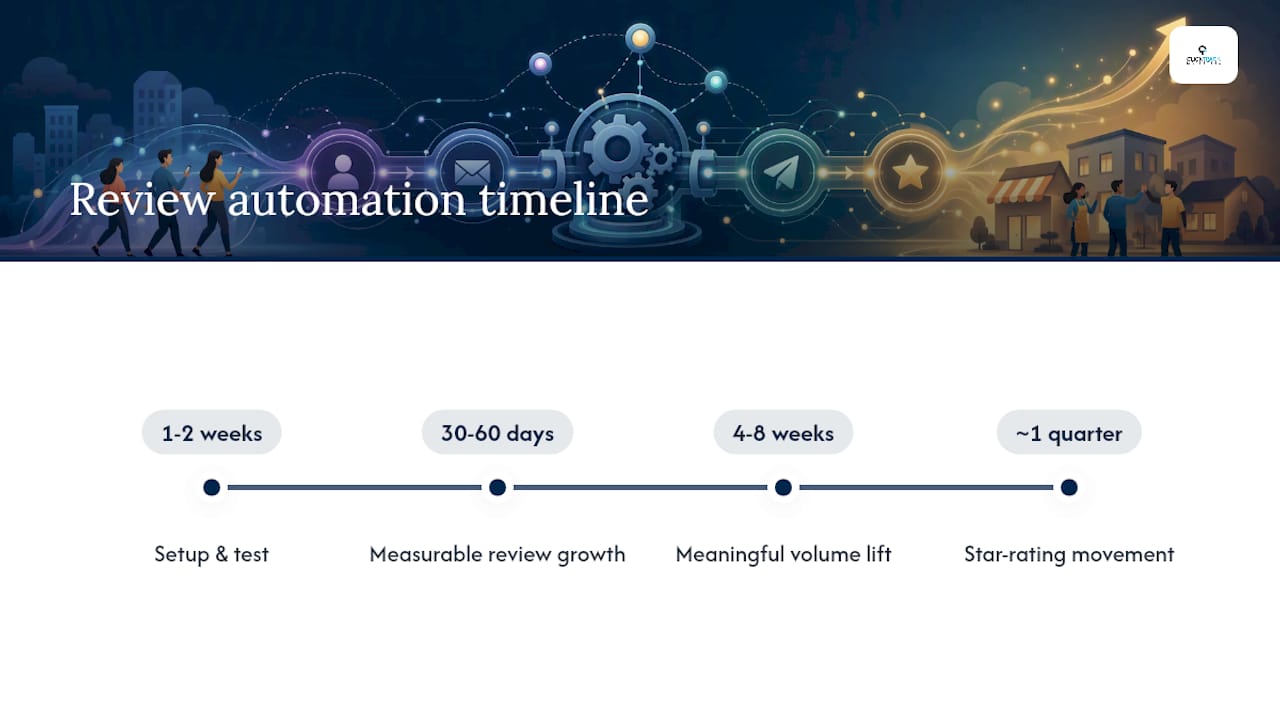
Expect a working setup within one to two weeks and measurable review growth within 30 to 60 days. Week one typically covers technical setup: connecting your CRM or booking system to a review request tool, confirming your Google Business Profile is verified, and cleaning your contact list. Week two is for testing, sending a small batch of requests to confirm delivery, links work, and opt-out handling functions correctly before opening the gates fully.
Once live, most businesses start seeing new reviews trickle in within days, since the system is finally asking every eligible customer instead of a fraction of them. The meaningful volume increase, the kind that shows up in your Google Business Profile review count and starts influencing local pack rankings, tends to appear over the following four to eight weeks as the backlog of recent customers works through the sequence.
Two caveats worth setting expectations around. First, review growth compounds; a business generating five reviews a month manually might see fifteen to twenty within two months of automation, not overnight. Second, star rating movement lags review count. If you already have a strong rating, expect it to hold steady while volume climbs. If your rating needed improvement, the shift becomes visible only after enough new reviews outweigh older ones, which usually takes a full quarter.
Treat the first 60 days as a calibration period. That's the window to test timing, tighten your trigger, and confirm your channel mix, before judging whether the investment paid off.
What Does Review Automation Actually Cost?
Total cost of ownership breaks into three buckets: the subscription, integration work, and ongoing maintenance. Standalone review request software typically runs as a monthly subscription scaled to request volume or location count. Businesses using a native feature inside their existing CRM or booking platform may pay little to nothing extra, since it's bundled into a plan they already have.
Integration costs vary the most. A no-code connection through Zapier or n8n might take a few hours of setup time and cost little beyond the connector's own subscription fee. A direct API integration or a fully vendor-managed build carries a one-time setup fee that reflects the complexity of your existing systems, particularly if you're pulling completion triggers from a CRM that wasn't designed with automation in mind.
Maintenance is the cost businesses most often underestimate. Contact data goes stale, message templates need periodic refreshing to avoid feeling robotic, and compliance requirements (especially around SMS opt-outs) need someone checking in regularly, not set once and forgotten. Budget a small amount of ongoing attention, whether that's an internal team member or an agency, for list hygiene and performance review each month.
The businesses that get the best return treat the subscription fee as the smallest part of the real cost. The setup quality and the ongoing attention matter more than which specific tool you pick.
How Do You Choose the Right Review Request Software?
Start feature comparison with the fundamentals: does the tool support trigger-based sending from your actual CRM or booking system, does it offer both SMS and email, and does it include satisfaction routing to protect against negative public reviews. Anything missing one of those three is asking you to build workarounds later.

Pricing models generally fall into three types: flat monthly fee regardless of volume, tiered pricing based on request volume or location count, and usage-based pricing that scales with the number of messages sent. Flat pricing works best for predictable, single-location businesses. Volume-based tiers make more sense for multi-location operations or businesses with seasonal spikes.
Customer support quality matters more than most buyers expect going in. Ask specifically how the vendor handles TCPA compliance questions and whether they provide guidance on message templates, not just software access. A tool with a helpful setup team saves weeks of trial and error compared to one that hands you a dashboard and disappears.
A capable reputation management partner can also show you real implementation examples across different business types, which is worth asking for before you commit to a contract length.
What Should You Watch Out For When Choosing a Tool?
The biggest red flag is any vendor that encourages filtering customers before sending requests, sending only to customers you predict will leave a positive review. That's gating, and it violates Google's guidelines regardless of how the vendor frames it. If a sales rep pitches this as a feature, walk away.
A second common pitfall is choosing a tool with no satisfaction routing step at all. Without it, every customer, happy or not, gets pushed to the same public review link, and you have no mechanism to catch and privately resolve a bad experience before it becomes a public one-star review.
Watch for vendors that lock you into long contracts before you've tested actual delivery rates. SMS deliverability varies by provider, and a tool that looks great in a demo can underperform once real customer numbers, landlines, disconnected numbers, and typos included, hit the system. Ask for a trial period or month-to-month option before signing anything longer.
Finally, be cautious of tools that don't clearly document TCPA opt-out handling or that bury consent language in fine print. If compliance isn't a visible, explained part of the product, assume it's an afterthought, and that exposure eventually lands on your business, not the vendor's.
Treat Review Automation as Infrastructure, Not a Campaign
The mistake I see most often is businesses judging review automation by review count alone. Count is a vanity number until you connect it to attribution: did local leads increase, did booked calls rise, did revenue move? At Click Track Marketing, we've watched review volume shifts change paid media decisions directly, when organic local visibility improves, budget shifts away from paid ads chasing the same customers. If you're starting from scratch, don't obsess over message wording first. Pick your trigger, test your timing window, and let the data tell you what to fix next.
How Click Track Marketing Builds Review Automation That Pays For Itself
Click Track Marketing sets up review request automation as one piece of a larger measurement system, not a standalone tool bolted onto your website. Where most vendors stop at sending texts and counting stars, we connect review growth to Answer Engine Optimization and revenue attribution, so you can see whether more reviews actually turned into more booked appointments and dollars, not just a higher star count on your profile.
Clients typically see review volume climb within the first 60 days alongside a measurable increase in leads attributable to Google Maps and AI answer citations, tracked through our PeopleLytics reporting dashboard rather than guessed at. If you want a fast, no-cost way to see where your current setup falls short, grab the free AEO checklist and see exactly what's missing from your review and visibility infrastructure. If you'd rather talk through your specific setup, book an application call and we'll walk through what automation and attribution would look like for your business.
Sources
For deeper tactics on generating and managing reviews once your automation is live, see Click Track Marketing's Google reviews playbook and how review volume feeds local search rankings. For background on automation infrastructure generally, this guide to marketing automation is a useful primer.
- SMS vs Email Review Requests: The Data on What Works Better | ReviewRoket Resources
- Statista: local business recommendation methods
Want to know exactly which marketing is making you money?
Get a free attribution audit — we'll show you where your leads and revenue actually come from. Answer two quick questions to start.