

Quick Answer
To appear in Google AI Overviews, your page must be crawlable, indexed, and eligible to show a snippet in standard Google Search. No special schema, AI text files, or extra markup is required. Google confirms that the same foundational SEO practices that earn organic rankings are the basis for AI Overview inclusion.
Here is what that means in practice:
- Your page must be indexed and snippet-eligible in Google Search
- Crawling must be allowed via robots.txt and your hosting infrastructure
- Content must be helpful, reliable, and written for people first
- Pages need clear textual content, supported by quality images or video where relevant
- Internal linking helps Google discover and connect your pages
- A good page experience across devices matters
Getting these basics right puts you in the pool. What happens next depends on how well your content answers the query.
How Google AI Overviews work
Google AI Overviews use retrieval-augmented generation (RAG) to pull relevant passages from indexed pages and synthesize a summary answer. The system retrieves pages from Google's core index, reviews specific information from those pages, and generates a response with prominent, clickable links back to the sources.
AI Overviews only appear when Google's systems determine they add value beyond what classic search results already provide. They are not triggered for every query. For complex questions where a synthesized answer genuinely helps, the feature surfaces. For simple navigational queries, it often does not.
Organic ranking influences your chances. Sites that rank well in standard search are more likely to be cited as trusted sources in AI Overviews, because Google's retrieval layer draws from the same index. AI Overviews and AI Mode are separate features that use different models and may show different results, though both pull from the same underlying index.
There are no AI-specific ranking factors published by Google. The selection criteria are content quality, reliability, and how well a page covers the query.
## 1. Make sure your pages are crawlable and indexed
Eligibility starts with access. If Googlebot cannot crawl your page, it cannot appear anywhere in Google Search, including AI Overviews. Check your robots.txt file, confirm your CDN or hosting infrastructure does not block crawling, and verify that target pages are indexed using Google Search Console.
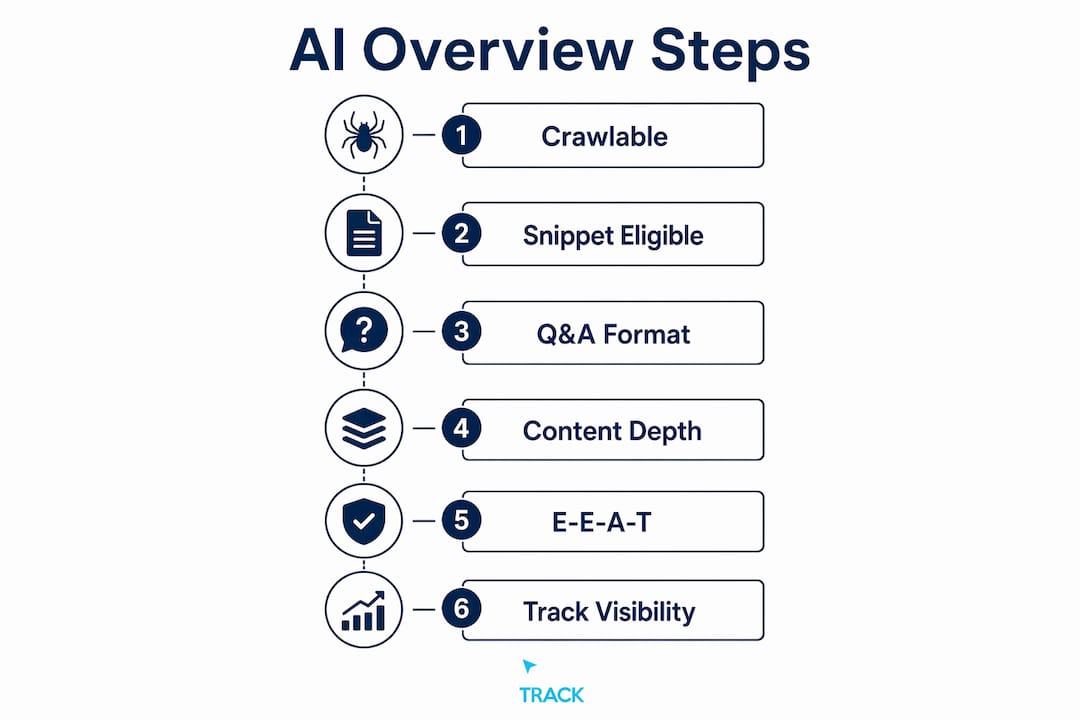
Snippet eligibility is the second gate. A page must be eligible to show a snippet in standard search results to qualify as a supporting link in an AI Overview. Review your meta tags and ensure you have not accidentally blocked snippets with nosnippet directives.
2. Write content as question-and-answer pairs
Structure your content the way AI systems retrieve it. Phrase your H2 and H3 headings as real questions a person would ask, then open the paragraph directly below with a 40, 80 word direct answer. The retrieval layer pattern-matches this structure, and the first paragraph below a heading is the most likely citation candidate.

After the direct answer, expand with examples, context, or edge cases. That depth serves readers who want more and signals to Google that your page covers the topic thoroughly.
3. Format pages for passage retrieval
Short paragraphs, descriptive subheadings, bullet lists, and comparison tables all help Google's systems slice your content into clean candidate passages. Walls of text make extraction harder. Well-formatted pages produce cleaner results.
Use one H1, descriptive H2s phrased as questions, and H3s for sub-points. Do not skip heading levels. Bold key terms sparingly inside paragraphs to signal what matters.
Pro Tip: Keep your opening 150 words self-contained. A reader, or an AI system, should be able to read just that section and walk away with a complete answer to your page's core question.
4. Create content that earns citations
AI Overviews reward content that is comprehensive without padding and includes citation-worthy original research, specific statistics, or trusted sources. Generic claims do not get cited. Specific, sourced facts do.
Pages that introduce a precise, sourced number get cited as the carrier of that fact. Original research, first-party data, and proprietary analysis are citation magnets because the model prefers sourcing a fact to its origin rather than to a site that simply repeats it.
Cover your topic at multiple levels: definition, mechanics, examples, and edge cases. Depth helps. Padding hurts.
5. Follow E-E-A-T principles throughout your content
Google evaluates content quality through the lens of Experience, Expertise, Authoritativeness, and Trustworthiness. For AI Overview inclusion, this means your content should reflect genuine knowledge, not surface-level summaries of what other sites already say.
Add a real author byline with credentials. For health, finance, or legal topics, include a "reviewed by" line with a verifiable expert. Link author profiles to real, external references. These signals tell Google's systems that a qualified person stands behind the content.
Pro Tip: Earn at least one third-party mention from a credible source, such as an industry roundup, a podcast appearance, or a guest post. Brand authority signals in AI Overview selection track third-party context, not just backlinks.
6. Skip the AI-specific hacks
Google explicitly confirms that llms.txt files, AI text files, and special schema are unnecessary and ineffective for AI Overview inclusion. You do not need to "chunk" your content into tiny pieces. You do not need FAQPage markup solely to target an AI Overview.
Pursuing these tactics wastes time that could go toward improving actual content quality. The technical requirements are the same ones that govern standard Google Search eligibility. Nothing more.
Note that Google-Extended controls usage rights for broader AI training but does not influence AI Overview ranking or visibility.
7. Use Google Search Console to track AI visibility
The Generative AI performance report in Google Search Console shows how often your pages appear in AI Overviews and AI Mode. It launched in June 2026 and provides impressions broken down by page, country, device, and date.
Here is what the report includes and what it does not:
| The report includes | The report does not include |
|---|---|
| Impressions in AI Overviews and AI Mode | Clicks and click-through rate |
| Impressions in Discover's AI features | The queries that triggered appearances |
| Breakdown by page, country, device, and date | Data from ChatGPT, Perplexity, or Gemini |
The report intentionally excludes clicks and queries to keep the focus on content quality and long-term strategy. Use it to identify which pages Google's AI features surface most, spot pages that should be appearing but are not, and track trends over weeks rather than reacting to daily fluctuations.
Best practices for using the report:
- Sort by impressions to find your strongest AI-visible pages and study what they do well
- Flag pages with low impressions that cover high-value queries as candidates for a content improvement pass
- Watch the trend line over weeks, not individual days
- Pair the report with your own attribution data to connect AI impressions to actual revenue
8. Control whether your content appears at all
Google now provides a toggle in Search Console that lets website owners decide whether their pages appear in generative AI Search features, including AI Overviews, AI Mode, and AI Overviews in Discover. Sites that opt out will not receive traffic or impressions from these features. The opt-out does not affect rankings in standard search results.
This control is worth knowing about, but opting out means losing the traffic that AI features can drive. AI Overviews now has a very large monthly active user base, and the feature is designed to send people to websites, not replace them.
9. Shift from traditional SEO to Answer Engine Optimization
The shift from traditional SEO to Answer Engine Optimization (AEO) means structuring content as concise, authoritative answers that AI systems can cite. The underlying principle is the same: earn Google's trust through quality. The execution is different: write for extraction, not just for reading.
Every important page should lead with a direct, self-contained answer. Structure should support passage retrieval. Content should cover the topic deeply enough to be the definitive source. This is what AI-structured websites do differently from standard web pages.
Use the free AEO checklist from Click Track Marketing to audit your pages against these criteria before resubmitting to Google Search Console.
Connecting AI visibility to real revenue
Impressions in Google Search Console confirm you are appearing in AI features. They do not tell you whether those appearances are producing customers. That gap is where most measurement stops.
Click Track Marketing's tools close that gap. PeoplePixel identifies the anonymous visitors most businesses never see. BuyerSignals surfaces intent data so you know who is actively in the market. PeopleLytics ties it all back to revenue through a weekly attribution dashboard, showing exactly which content and channels are producing customers. Understanding how marketing attribution works is what separates teams that know their AI content is working from teams that are guessing.
The goal is not more impressions. The goal is knowing which impressions turned into revenue and doubling down on what produced them.
Key Takeaways
Appearing in Google AI Overviews requires indexed, snippet-eligible pages built on core SEO fundamentals, structured as direct question-and-answer pairs with original, citation-worthy content.
| Point | Details |
|---|---|
| No special requirements | Pages need only meet standard Google Search eligibility: crawlable, indexed, and snippet-eligible. |
| Structure drives citations | Format pages as question-and-answer pairs with a direct 40, 80 word answer below each heading. |
| Search Console is your baseline | The Generative AI performance report shows impressions by page, country, device, and date, but not clicks or queries. |
| Opt-out is available | A Search Console toggle lets you remove your site from AI features without affecting standard search rankings. |
| Click Track Marketing closes the loop | PeoplePixel, BuyerSignals, and PeopleLytics connect AI visibility to real revenue, not just impressions. |
What Click Track Marketing builds for you
Most agencies are still optimizing for a search experience that is fading. Click Track Marketing builds the infrastructure for the one replacing it.
Getting your content into AI Overviews is one piece. Knowing whether those appearances are producing customers is the harder problem, and the one most teams leave unsolved. Click Track Marketing builds AI-structured websites engineered to be cited by answer engines, pairs them with AEO strategy grounded in E-E-A-T principles, and then closes the loop with attribution tools that show exactly where revenue is coming from. PeoplePixel, BuyerSignals, and PeopleLytics replace impression reports with real answers. If you want to know whether your AI visibility is making money, grab the free AEO checklist and see where your pages stand today.
Want to know exactly which marketing is making you money?
Get a free attribution audit — we'll show you where your leads and revenue actually come from. Answer two quick questions to start.