

Quick Answer
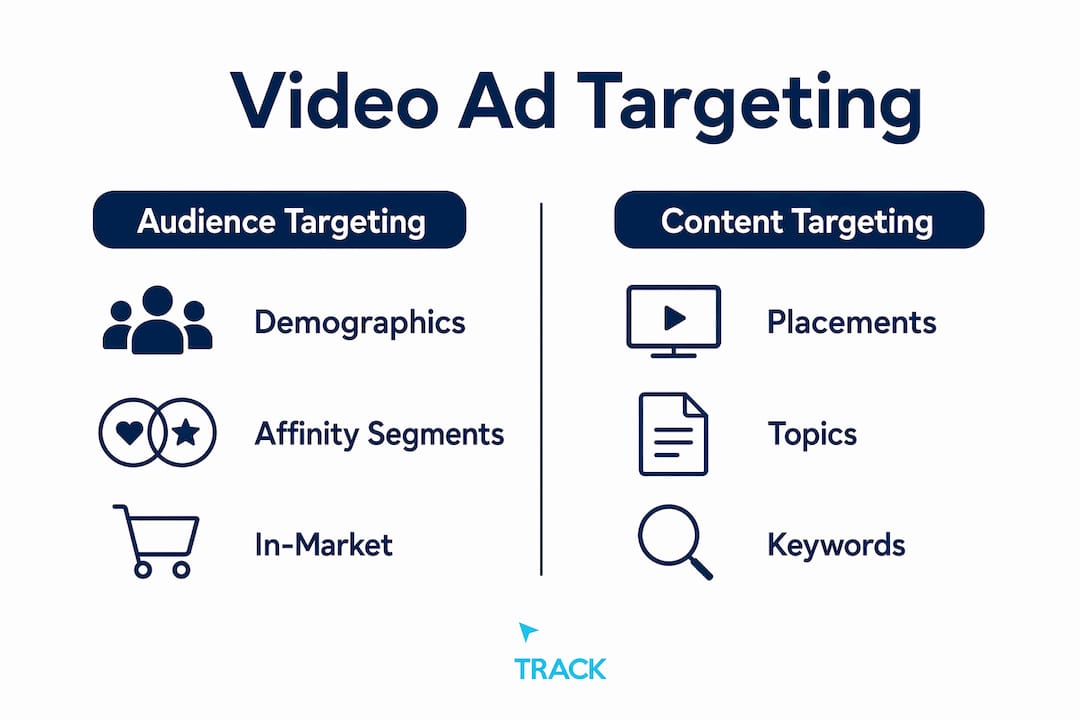
Video ad targeting is the practice of controlling who sees your video ads and where those ads appear. It works across two core dimensions: audience targeting (who the viewer is) and content targeting (where the ad runs).
Those two dimensions are what separate a wasted video budget from one that actually produces customers. Get them right and your ads reach people who are ready to act. Get them wrong and you pay to entertain people who will never buy.
TLDR:
- Start with broad audience targeting and let platform algorithms find converters before you layer restrictions.
- Add content or placement targeting when contextual fit matters more than scale, such as brand safety or niche category alignment.
- Tie every campaign to first-party measurement from day one. View counts are not a business outcome.
Table of Contents
- How video ad targeting works: audience vs. content targeting
- Which audience types should you use for video campaigns?
- How content and placement targeting give you control over context
- How geo, device, language, and frequency controls shape delivery
- Why combining targeting parameters can hurt delivery
- How to measure video ad performance and tie it to revenue
- A quick setup checklist for your first YouTube video campaign
- Why first-party data changes what video targeting can do
- Key Takeaways
- Why attribution discipline matters more than targeting sophistication
- Video targeting without the guesswork
- Useful sources
- FAQ
How video ad targeting works: audience vs. content targeting
Video ad targeting splits into two distinct dimensions that operate differently and serve different goals.
Audience targeting answers the question "who." You define the viewer by their demographics, interests, purchase intent, or past behavior. Google and YouTube build these audience profiles from search history, app activity, and on-site behavior. When you target an in-market audience for home improvement, your ad follows that viewer across YouTube regardless of what video they are watching.
Content targeting answers the question "where." You choose the channels, videos, topics, or keywords that describe the environment where your ad appears. A plumbing company targeting the "Home Repair" topic will show ads on videos about fixing pipes, whether or not the viewer has ever searched for a plumber.
The critical operational detail: when you combine both dimensions, the platform applies AND logic. A viewer must satisfy both criteria to see your ad. That intersection raises relevance but shrinks reach. A broad audience paired with a narrow placement list can cut your eligible impressions to a fraction of what either setting would deliver alone.
Which audience types should you use for video campaigns?
YouTube audience targeting covers six main subtypes, and each fits a different stage of the funnel.

Demographics let you filter by age, gender, parental status, and household income. Google Ads offers household income targeting in the United States, with multiple income brackets available. One important note from Google's demographic targeting documentation: the "Unknown" demographic category is selected by default because excluding it significantly narrows your audience. Only exclude "Unknown" when you are certain you want a tight restriction.
Affinity segments target viewers with a demonstrated, long-term interest in a topic. Think "Outdoor Enthusiasts" or "Cooking Enthusiasts." These are best for brand awareness at the top of the funnel where reach matters more than precision.
In-market segments identify viewers who are actively researching a purchase. Google infers this from recent search and browsing behavior. These audiences convert at a higher rate than affinity audiences and work well for mid-funnel campaigns.
Custom segments bring search intent directly into YouTube. You supply a list of keywords that your ideal buyer recently searched on Google.com, and the platform targets viewers who match that search behavior. This is one of the sharpest tools available for reaching buyers at the moment of decision.
Life events target viewers during major transitions: moving, getting married, graduating. Purchase behavior shifts sharply during these windows, which makes life events useful for categories like insurance, furniture, or financial services.
Remarketing and customer match use your own first-party data. You can build audiences from site visitors, video viewers, and uploaded customer lists to retarget via video campaigns. These audiences tend to convert at the highest rate because the viewer already knows your brand.
| Audience type | Best use case | Precision vs. scale | Typical cost model |
|---|---|---|---|
| Demographics | Broad awareness, exclusion filters | Low precision, high scale | CPM |
| Affinity | Brand awareness, reach campaigns | Low precision, high scale | CPM/CPV |
| In-market | Mid-funnel consideration | Medium precision, medium scale | CPV/CPM |
| Custom segments | High-intent, near-purchase | High precision, lower scale | CPV/CPC |
| Life events | Category-specific moments | Medium precision, lower scale | CPM/CPV |
| Remarketing | Re-engagement, conversion | Highest precision, lowest scale | CPV/CPC |
| Customer match | Existing customer upsell | Highest precision, lowest scale | CPV/CPC |
Pro Tip: When your goal is conversions, resist the urge to stack every audience filter you can think of. Google recommends keeping targeting broad for conversion-focused campaigns so the algorithm can surface converters you would never have predicted manually.
How content and placement targeting give you control over context
Content targeting controls the environment where your ad appears, independent of who the viewer is. It includes three main tools: placements, topics, and keywords.

Placements are the most direct form of content targeting. You select specific YouTube channels, individual videos, websites, or apps. A financial advisor could target a specific personal finance YouTube channel and appear only on that creator's content. One practical requirement: Google Ads requires at least 10 channels or videos to save a placement list, which prevents setups so narrow they cannot deliver at all.
Topics let you target a broad category across YouTube and the Google Display Network. Selecting "Automotive" means your ad can appear on any video related to cars, regardless of the specific channel. Topics trade precision for scale and work well when you want category-level relevance without hand-picking placements.
Keywords match your ad to videos, channels, or websites whose content relates to the words you specify. This is contextual matching at a granular level. A keyword list around "home renovation tips" will surface your ad on content that discusses those themes.
Modern contextual targeting has grown more sophisticated. CTV and premium video platforms now analyze content at the genre, program, scene, and even emotional tone level. That means you can match an ad for a calming skincare product to content with a relaxed, low-energy tone rather than just a broad beauty category.
Key considerations for content targeting:
- Adding content targeting always restricts reach compared to audience-only campaigns.
- Placement targeting is the strongest brand safety tool available because you control the exact environment.
- Combining topics and keywords in the same ad group applies OR logic within the content dimension, which broadens rather than narrows delivery.
- Content targeting works well when your product has strong contextual fit and the category is specific enough to define a meaningful placement list.
How geo, device, language, and frequency controls shape delivery
These four operational controls do not define who your audience is. They define the conditions under which your ad can appear.
Geographic targeting in Google Ads ranges from country level down to state, DMA, city, and zip code. A local service business in San Diego should target at the DMA or city level to avoid paying for impressions in markets it cannot serve. National e-commerce brands often start at the country level and then layer bid adjustments by region based on conversion data.
Device targeting lets you separate delivery across computers, smartphones, tablets, and connected TV screens. Device choice matters most when your creative is built for a specific format. A 15-second vertical video performs differently on mobile than on a living room TV screen. If your landing page is not mobile-optimized, excluding or reducing bids on mobile devices protects your conversion rate.
Language targeting matches your ad to viewers whose browser or app language matches your selection. For a Spanish-language campaign in the United States, language targeting prevents your ad from running on English-language content where it would be irrelevant.
Frequency capping limits how many times a single viewer sees your ad within a set period. A retail campaign running a promotional offer might cap at three impressions per week to maintain urgency without causing fatigue. A lead generation campaign for a high-consideration service might allow more exposures because the decision cycle is longer. Google Ads lets you set frequency caps at the campaign, ad group, or ad level.
Why combining targeting parameters can hurt delivery
Every targeting criterion you add narrows the pool of eligible impressions. Audience targeting combined with content targeting applies AND logic, meaning a viewer must satisfy every condition simultaneously. Add a narrow custom segment, a short placement list, a specific device type, and a tight geo, and you may have an audience of a few thousand people in a market that needs tens of thousands of impressions to generate meaningful data.
Common mistakes that collapse delivery:
- Stacking a custom segment with a narrow placement list and a tight demographic filter in the same ad group.
- Excluding the "Unknown" demographic segment without realizing it removes a large portion of eligible viewers.
- Building a placement list with fewer than 10 channels, which prevents the list from saving in Google Ads.
- Using topic targeting and placement targeting together expecting them to narrow delivery, when in fact they apply OR logic within the content dimension.
Exclusions are a different tool. They protect brand safety by preventing your ad from appearing on specific channels, videos, topics, or content categories. A children's brand might exclude "Mature Audiences" content categories. An e-commerce brand might exclude competitor channels. Exclusions subtract from eligible inventory without the AND gating problem.
Pro Tip: Run a simple three-cell test before committing budget: one ad group with broad audience only, one with content targeting only, and one with both combined. Compare CPA and conversion volume across all three after enough data accumulates. The results usually surprise even experienced media buyers.
How to measure video ad performance and tie it to revenue
View metrics tell you about attention. Conversion metrics tell you about revenue. You need both, but they are not equal.
View rate is the percentage of viewers who watch your ad past the skip point or to completion. A high view rate signals that your creative is holding attention. It does not tell you whether those viewers bought anything.
View-through conversions count conversions that happen after a viewer sees your ad but does not click. These are useful for awareness campaigns but require careful interpretation because the attribution window can overlap with other channels.
Engaged views measure viewers who watch at least 10 seconds of a skippable ad. This metric sits between a raw view and a click and is a reasonable proxy for genuine interest.
CPA (cost per acquisition) and ROAS (return on ad spend) are the metrics that connect video spend to business outcomes. They require conversion tracking to be set up correctly before the campaign launches.
| Campaign objective | Primary metric | Secondary metric | Attribution model |
|---|---|---|---|
| Brand awareness | View rate, reach | Frequency | Impression-based |
| Consideration | Engaged views, VTR | Click-through rate | Data-driven or linear |
| Conversions | CPA, ROAS | Conversion volume | Data-driven or last click |
| Remarketing | ROAS, conversion rate | CPA | Last click or data-driven |
Attribution for video is more complex than for search. Last-click attribution undercounts video's contribution because most viewers do not click. A data-driven attribution model, available in Google Ads, distributes credit across touchpoints based on actual conversion path data. For tying video spend to revenue, the most reliable setup combines server-side event tracking with first-party conversion data so you are not dependent solely on platform-reported numbers.
CTV campaigns add another layer: they operate without cookies, using household identifiers and IP-based signals to track exposure. Frequency control at the household level is possible, but cross-device attribution requires a deliberate measurement plan.
A quick setup checklist for your first YouTube video campaign
Use this as a baseline. Adjust based on your specific objective and budget.
- 1Set your campaign objective in Google Ads. Choose "Awareness and reach," "Consideration," or "Sales" depending on your goal. The objective determines which bidding strategies and ad formats are available.
- 2Choose your primary audience. Start with one audience type. For a new campaign, in-market or custom segments give you intent signals without over-restricting reach.
- 3Decide on content targeting. If brand safety or contextual fit is a priority, add a topic or a placement list. Remember the minimum of 10 channels or videos for placement lists. If your goal is conversions, consider skipping content targeting initially.
- 4Set geographic and language targeting. Match these to your actual service area and the language of your creative.
- 5Configure frequency capping. A starting point of three to five impressions per user per week works for most campaigns. Adjust based on campaign length and budget.
- 6Select your bidding model. CPV (cost per view) works for awareness. Target CPA or Target ROAS works for conversion campaigns with enough historical data.
- 7Set up conversion tracking before launch. Without it, you cannot measure CPA or ROAS. Use Google Ads conversion tags or import goals from Google Analytics 4.
- 8Run a reach forecast. Google Ads provides an inventory forecast tool. If your targeting combination returns a very low forecast, loosen one criterion before launching.
- 9Launch with a test structure. Three ad groups: broad audience, content only, combined. Run for at least two weeks before drawing conclusions.
- 10Review pacing after 48 hours. If the campaign is underspending, your targeting is likely too narrow. If it is overspending, check your frequency cap and geo settings.
For practical campaign setup examples and targeting strategies for creators, the setup principles translate well across platforms even when the interface differs.
Why first-party data changes what video targeting can do
Platform signals are useful. Your own data is better.
When you connect first-party data to your video campaigns, you move beyond guessing at who might be interested and start targeting people with demonstrated intent. Remarketing and customer match let you upload customer lists, retarget site visitors, and build lookalike-style audiences from your best buyers. That is a fundamentally different starting point than a broad in-market segment.
Tools like PeoplePixel, Click Track Marketing's visitor identification product, surface anonymous site visitors and match them to behavioral signals. When you feed that data back into your video campaigns, you can sequence ads based on what a visitor actually did on your site rather than what the platform assumes about them. A visitor who viewed your pricing page three times is a different audience than someone who bounced from the homepage.
The measurement side matters just as much. Setting up server-side or first-party event capture lets you combine video exposure data with on-site conversion events. That combination reduces dependence on platform-reported attribution and gives you a cleaner read on actual ROAS.
Pro Tip: Before you trust any video campaign's reported performance, check whether your conversion events are firing correctly in Google Tag Manager or your server-side setup. Platform attribution inflates results when tracking is incomplete. First-party event data is the behavioral targeting signal that actually holds up under scrutiny.
Key Takeaways
Video ad targeting works best when you separate audience decisions from placement decisions, test before restricting, and tie every metric back to revenue rather than attention.
| Point | Details |
|---|---|
| Two core dimensions | Audience targeting controls who sees your ad; content targeting controls where it appears. |
| AND logic narrows reach | Each added targeting criterion reduces eligible impressions; test broad before layering restrictions. |
| Start broad for conversions | Google recommends keeping targeting broad for conversion campaigns so algorithms can find converters. |
| First-party data wins | Remarketing and customer match lists outperform platform-only segments for precision and conversion rate. |
| Click Track Marketing | Click Track Marketing connects video spend to revenue using PeoplePixel and first-party attribution, not platform-reported view counts. |
Why attribution discipline matters more than targeting sophistication
Most video campaigns fail not because the targeting was wrong but because there was no way to know whether it worked. Marketers spend weeks refining audience segments and placement lists, then measure success by view rate. That is the wrong order of operations.
The campaigns that produce real business outcomes start with measurement infrastructure. Conversion tracking, server-side events, and first-party data capture come before the first dollar of spend. Once that foundation is in place, targeting decisions become testable rather than theoretical. You can run the three-cell test described above and get an actual answer about which setup drives the lowest CPA, not just the highest view rate.
Answer Engine Optimization follows the same logic. When your site is structured so AI engines can read and cite it, and when your campaigns are tied to revenue signals rather than platform metrics, you build infrastructure that compounds. Each campaign teaches you something you can use in the next one.
Video targeting without the guesswork
Click Track Marketing sets up video campaigns the way they should have been set up from the start: with conversion tracking in place before launch, first-party data feeding audience decisions, and weekly attribution reporting that shows which spend produced revenue.

The agency's PeoplePixel tool identifies anonymous site visitors and feeds that signal back into video targeting, so your remarketing audiences are built from real buying behavior rather than platform estimates. PeopleLytics delivers a weekly dashboard that connects video exposure to actual revenue, not just views and clicks.
If you want a practical starting point, the free AEO checklist covers the measurement and site-structure steps that make video campaigns measurable and AI-ready. Or if you want to talk through your specific setup, book a consultation with the Click Track Marketing team.
Useful sources
The following resources support the guidance in this article and are worth bookmarking for deeper reference.
- About targeting for Video campaigns, Google Ads Help: the primary reference for all audience and content targeting types available in Google Ads video campaigns.
- Add targeting to your Video campaigns, Google Ads Help: covers placement minimums, content targeting setup, and Google's recommendations for conversion-focused campaigns.
- About demographic targeting, Google Ads Help: explains the "Unknown" demographic segment and how exclusions affect reach.
- IAB Guide to Digital Video Advertising: a comprehensive reference on video ad formats, pricing models, and measurement frameworks.
- How Does CTV Advertising Work? Technical Guide: covers household-level targeting, ACR data, and cookieless measurement for connected TV.
- Click Track Marketing also publishes guides on behavioral targeting and retargeting mechanics that complement this article.
Want to know exactly which marketing is making you money?
Get a free attribution audit — we'll show you where your leads and revenue actually come from. Answer two quick questions to start.